This post breaks down a practical workflow for turning scanned antigram tables into structured data. It covers the extraction pipeline, schema design, validation checks, and the failure patterns we saw in real scans.
OCR table extraction is the process of converting tables in scanned documents into structured, machine-readable data while preserving rows, columns, and relationships. Unlike plain OCR, it focuses on layout integrity so values remain aligned with the correct headers.
Problem: Why OCR Table Extraction Is Hard
Automating antibody identification depends on accurately reading antigram tables, yet these reports are rarely OCR-friendly. Dense grids, inconsistent spacing, and multi-column layouts often confuse traditional OCR engines like Tesseract or EasyOCR. The output might look close at first glance, but during parsing the table into rows and columns, values can shift into the wrong place, headers can get mixed up, or cells can be merged. With antigrams, that kind of parsing error is a deal-breaker because one misplaced “+” or “0” can change what the table is actually saying.
In a blood bank management system, that kind of mismatch can’t be treated as a minor OCR issue because it directly impacts how the extracted data is used downstream.
This case study shows how we built a structured OCR pipeline for OCR table extraction that reached over 90 percent usable accuracy on scanned antigram images. The goal wasn’t just to read text from an image, but to make parsing reliable by preserving table structure, keeping column meanings consistent, and maintaining semantic correctness so the extracted data could be safely used in our antibody identification workflow.
Table Extraction Options: Tools and Models to Consider
Common approaches for OCR table extraction include:
-
Traditional OCR engines (text-focused, weak structure handling)
-
LLMs such as GPT and Gemini (reasoning-heavy, inconsistent layout fidelity)
-
Vision-language models like LLaVA and Qwen-VL
-
Structured document OCR engines such as PaddleOCR and Mistral OCR
Structured OCR Approach for Parsing Complex Tables
A structured document parser was the best fit for the data we had, and this is the approach that brought us closer to 90%+ accuracy. The reason is simple: these specialized models are trained for OCR on complex documents, especially tables with irregular layouts and multi-row or inconsistent header structures. For OCR table extraction, that structure awareness matters more than raw text recognition.
My star-performing OCR engine: Mistral OCR 3
Mistral OCR 3 was the engine that performed best in our pipeline. It’s a flagship OCR solution from Mistral for document and image parsing, with strong support for extracting tables reliably.
It returned output in our specified JSON format, which made it easier to post-process and integrate into the rest of our extraction chain. We also provided a Result JSON Schema that matched the general format of the antigram tables we needed to parse, which improved consistency and reduced cleanup.
Processing time averaged 1 to 1.5 minutes, which was acceptable because the image quality we were working with was typically 3–4 MB per scan. These were machine-scanned, high-resolution images (around 4K), so the tradeoff between speed and accuracy worked well for our use case.
Step-by-Step Pipeline for Parsing Antigram Tables
Once we decided to use Mistral OCR 3 as our core engine, the next step was to design a clear and repeatable extraction pipeline. At this stage, the goal wasn’t to build something overly complex, but something reliable, understandable, and easy to debug
At a high level, our antigram table parsing pipeline followed five steps:
1. Image Preprocessing (Minimal but Important)
Since our antigram reports were machine-scanned and already high-quality, we avoided heavy preprocessing. Early experiments showed that over-processing actually degraded OCR results. Instead, we focused on a few small but crucial steps:
-
Ensuring the correct orientation of each image (auto-rotation if needed)
-
Converting images to a consistent format, like PNG
-
Avoiding compression artifacts that could confuse OCR
By keeping preprocessing minimal, we maintained consistent OCR output without introducing unnecessary noise.
Also read about: Image identification through YOLOV8
2. Defining the Table Schema
One of the most important lessons I learned was that OCR accuracy isn’t just about recognizing text, it’s about preserving structure. Before running OCR, we defined a generic JSON schema that matched the most common table formats in our antigram reports. This schema included:
-
Table headers (when available)
-
Row-wise key-value mappings
-
Optional fields to handle missing or merged columns
Providing this schema upfront allowed Mistral OCR to return structured output instead of raw text blobs. This drastically reduced the amount of post-processing we needed and made the pipeline more predictable and easier to maintain.
Example JSON Schema:
{
"antigen_table": {
"headers": ["Rh", "D", "C", "E", "c", "e", "..."],
"rows": [
{
"row_id": "string",
"rh_shorthand": "R1R1 | R2R2 | ...",
"results": [
{
"antigen": "string",
"value": "+ | 0 | nt | / | +s"
}
]
}
]
}
}
3. Running Mistral OCR 3
Once the pipeline was ready, we ran Mistral OCR 3 on the images. Along with each image, we provided:
-
The expected output schema
-
Instructions to focus only on the tabular regions
-
Confidence thresholds to control extraction quality
Mistral OCR handled tricky situations that would usually break traditional OCR engines:
-
Irregular column spacing
-
Header rows spanning multiple columns
-
Missing or broken table borders
It wasn’t perfect, but the output was far more structured and reliable than what we got from Tesseract or EasyOCR.
4. Post-processing and Validation
Even with structured output, some cleanup was necessary to make the data fully usable. Our post-processing included:
-
Column alignment checks to ensure values stayed in the right place
-
Value normalization (for example: consistent symbols, formats, and expected value patterns)
-
Simple rule-based validation aligned with antigram table logic
This step alone boosted usable accuracy significantly and helped catch obvious OCR mistakes before downstream processing.
5. Error Patterns Observed
While the system worked well overall, we noticed some recurring issues:
-
Extremely dense tables with very small fonts
-
Handwritten annotations overlapping printed tables
-
Rare table formats that didn’t match our schema
Instead of forcing the model to handle every edge case, we logged these exceptions for manual review. This helped us avoid silent failures and kept the pipeline reliable in production.
Key Takeaways
This project made one thing really clear: table extraction is more about structure than OCR itself. While generic OCR engines work fine for plain text blocks, they struggle with complex antigram tables, where maintaining rows, columns, and relationships is critical.
Using a schema-guided OCR approach made a huge difference, allowing the model to return structured outputs instead of messy text blobs. High-quality images help, but they don’t solve layout complexity on their own. A small amount of post-processing and validation goes a long way in catching errors and improving overall accuracy.
For someone early in their ML career, this project was eye-opening. It reinforced that meaningful accuracy gains often come from smart system design and pipeline decisions, not just swapping in a “better” model. Also read about: Software architecture pattern for Front end development
Comparison of OCR Table Extraction Approaches
To evaluate whether Mistral OCR 3 was the right fit for our specific use case, we benchmarked it against other commonly used approaches on the same set of complex antigram tables containing dense and irregular tables. Rather than comparing generic OCR capabilities, the focus was on real-world performance in extracting structured tabular data from antigram images, where layout fidelity and accuracy matter far more than raw text recognition.
The table below compares common OCR approaches based on real-world antigram table parsing performance.
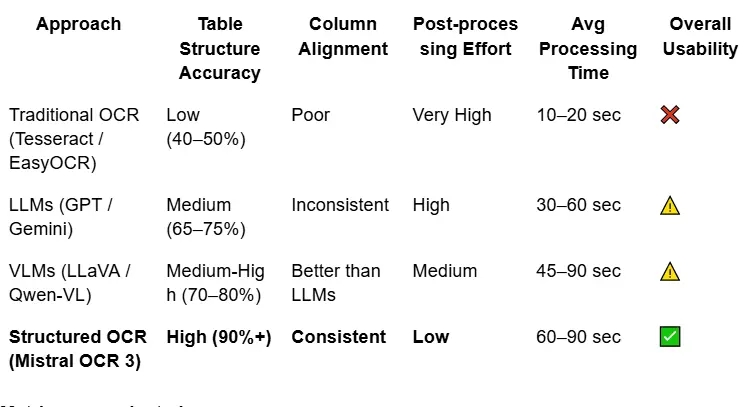
Metrics we evaluated:
-
Structure accuracy: Whether rows and columns stayed intact
-
Column consistency: Whether each column kept the same meaning across all rows
-
Post-processing effort: How much manual logic was needed to clean the output
-
End-to-end reliability: How often the output was usable without manual fixes
While Mistral OCR was slower than traditional OCR, the reduction in downstream complexity more than compensated for the increased processing time.
Failure Analysis
Even though Mistral OCR 3 delivered strong results overall, it wasn’t perfect. Several issues showed up during antigram table parsing that directly affected table structure accuracy and column alignment.
1. Extremely Dense Tables
Some tables were just too packed: very small font sizes, tight row spacing, and missing or faint borders. In these cases, the OCR sometimes:
-
Merged rows partially
-
Dropped cells in the middle of the table
These situations were rare, but when they occurred, recovery usually required manual review, since automated fixes weren’t reliable.
2. Mixed Content Overlapping Tables
Antigram often contains stamps, handwritten notes, or highlighted values. When these overlapped the table boundaries, Mistral OCR occasionally misclassified annotations as table data, which introduced noise into the structured output and increased cleanup effort during post-processing.
3. Schema Mismatch
If a table deviated significantly from the predefined Result JSON Schema, like extra columns, nested headers, or tables split across pages; the model would still return valid JSON. However, the output sometimes contained semantic inaccuracies, showing that a well-designed schema is just as crucial as the OCR model itself.
What We Would Improve Next
Looking back, the system worked well, but there’s definitely room for improvement. Here are a few ideas we would explore next to make the table parsing pipeline more accurate, flexible, and reliable across different antigram formats.
1. Adaptive Schema Generation
Right now, we rely on a single static schema for all tables. A smarter approach would be to:
-
Detect the table type before running OCR
-
Dynamically select or generate a schema that fits that table
-
Re-run OCR with the refined schema
This would help reduce failures caused by schema mismatches and make the system more flexible across different report formats.
2. Pre-OCR Table Detection
Adding a lightweight table detection step using models like YOLO or Detectron could help:
-
Focus only on table regions, cropping out unnecessary headers, footers, or noise
-
Improve OCR accuracy by removing distractions
-
Potentially reduce processing time by not running OCR on irrelevant parts of the page
This is especially useful when pages include multiple blocks of content beyond the table.
3. Confidence-Aware Validation
Currently, our validation is entirely rule-based. A more advanced approach could include:
-
Assigning confidence scores at the cell level
-
Automatically reprocessing low-confidence rows
-
Flagging ambiguous cases instead of forcing output
This would make the pipeline more robust and reduce errors slipping through, especially in tricky tables.
4. Agentic Document Extraction (ADE): Taking OCR to the Next Level
Traditional OCR is essentially “blind.” It converts pixels to text but doesn’t understand the importance of a misplaced value or a shifted column. That’s where Agentic Document Extraction (ADE) comes in. It treats the model not as a passive converter, but as an active reasoner and problem solver.
Instead of a simple linear pipeline, ADE uses a reasoning-extraction loop, similar to how a specialist reviews an antigram table. Here’s what makes it different:
Self-Correction & “Healing” Loops
An ADE agent doesn’t just flag errors, it attempts to fix them. For example, if a phenotype string shows up in the wrong field, the agent can pause, re-focus on the image, and correct the data in real time.
Contextual Triangulation
ADE can cross-check related data points. If a patient is marked as “Rh-Negative” but the antigen grid shows a “+” in the D column, the system detects this clinical contradiction and either re-extracts the data or flags it for human review.
Dynamic Tool Selection
The agent can choose the right tool for each part of the table: a layout parser for headers, a high-precision vision model for blurry sections, and a logic-based validation step for Rh shorthand against the phenotype.
Visual Grounding & Verification
ADE maintains a spatial link between the extracted JSON and the original pixels. This lets it verify values so a weak reaction (+s) isn’t mistakenly read as a zero (0).
Why ADE Matters for Blood Bank Data
In blood bank workflows, especially when working with antigram tables, data integrity matters more than speed. ADE adds a reasoning layer on top of OCR, so the system doesn’t just extract values, it checks whether the output still makes sense in context. That shifts the pipeline from “best guess” extraction to more self-auditing, reliable table parsing.
Because real antigram reports can be messy, inconsistent, and full of edge cases, ADE helps make table extraction safer, more consistent, and easier to trust in production
Final Thoughts
If there’s one practical lesson from this case study, it’s that reliable OCR table extraction comes from treating it like an engineering pipeline, not a single model call. The model matters, but what made the difference was tightening the interface between steps: minimal preprocessing to protect scan quality, schema-guided output to keep tables structured, and validation rules that catch “looks right but is wrong” errors before the data reaches the antibody identification workflow.
This kind of structured extraction pipeline fits naturally into broader AI automation workflows, where document parsing, validation, and downstream processing need to work together reliably.
The real win was reducing uncertainty. Instead of spending time cleaning messy OCR text, we focused on keeping column meaning stable across rows and making exceptions visible through logging and review. That combination, structured output plus guardrails, is what turned extraction into something we could trust in production. As we expand to more antigram formats, adaptive schemas and confidence-aware retries are the most direct upgrades to improve robustness without making the system complicated
As document formats evolve, approaches like adaptive schemas and agentic document extraction are likely to play a bigger role in scalable OCR table parsing.