After a year building social media automation at Saerin Tech LLC, we've learned that marketing teams aren't struggling with content creation, but instead they're drowning in coordination overhead. A simple post needs five Slack messages, two approval rounds, and someone remembering to hit publish. Multiply that across platforms, and it's a full-time job managing workflows.
We built AI automation that removes that friction by connecting existing tools into a continuous system. Content gets created, distributed, and engagement gets captured without constant human intervention.
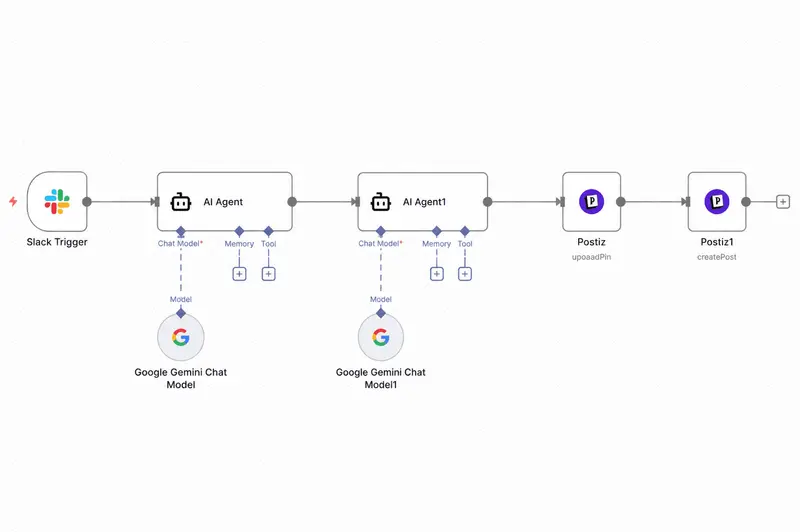
Social Media Automation Tech Stack: Slack → Postiz → Gemini
Our automation runs on three components that communicate through webhooks and APIs:
Slack is the control center teams trigger campaigns, approve content, and monitor activity through structured channels instead of scattered DMs.
Postiz handles multi-platform posting. It's an open-source scheduler supporting Instagram, LinkedIn, Twitter, Facebook, and TikTok through one API. We chose it over Buffer or Hootsuite because it's self-hostable with solid API documentation.
Google Gemini powers content generation and optimization drafting posts, adapting content for platforms, and rewriting based on engagement patterns.
The flow: Slack trigger → Gemini generates → Team approves → Postiz publishes → Engagement feeds back.
System 1: AI Social Media Manager
Traditional workflows take 2-3 days and 4 people for one post. Marketing manager posts ideas → designer creates visual → copywriter drafts → manager reviews → revisions → scheduling → publishing. For a 20-post campaign across 5 platforms? Weeks.
How It Works?
Trigger: Team member types /create-campaign product-launch in Slack with campaign brief and platform targets.
Content Generation: Gemini receives structured prompts including brand guidelines, platform specs, and recent high-performers. It generates platform-specific variations—Instagram gets visual-first language and hashtags, LinkedIn gets professional tone, Twitter gets punchy threads.
Approval Workflow: Generated content appears in Slack with "Approve," "Edit," or "Reject" buttons. Edits happen directly in Slack and sync to the queue.
Smart Scheduling: Postiz uses optimal posting windows from historical data. B2B clients: Tuesday-Thursday mornings for LinkedIn. B2C brands: evenings/weekends for Instagram.
Publication: Postiz handles platform formatting automatically cropping images to Instagram's square format, adapting captions to Twitter's limit, adding link previews.
Real Example: Product Launch Campaign
SaaS client launching a new feature. Here's the complete automation workflow:
Step 1: Campaign Initiation
Product manager types /create-campaign feature-launch in #marketing-automation Slack channel and provides:
-
Link to feature spec document (stored in Notion)
-
Target launch date: 7 days
-
Primary platforms: LinkedIn, Twitter, Instagram
-
Campaign objective: awareness + demo signups
This slash command triggers a webhook that hits our n8n automation workflow.
Step 2: Content Brief Extraction
The n8n workflow automatically:
-
Fetches the Notion document via Notion API
-
Extracts key information using Gemini: feature name, core benefits, target audience, use cases
-
Pulls brand voice guidelines from our PostgreSQL database (tone, style, prohibited words)
-
Retrieves last 10 high-performing posts from each platform via Postiz API for reference
All this context gets structured into a JSON object that feeds into the next step.
Step 3: AI Content Generation
The workflow sends a structured prompt to Gemini API that includes:
-
Campaign context from Step 2
-
Platform-specific requirements (character limits, hashtag best practices, content format)
-
Instructions: "Generate 3 LinkedIn posts, 5 Twitter posts, 3 Instagram posts with platform-native language"
Within minutes, Gemini returns structured content:
LinkedIn Posts Generated:
-
Post 1: Professional announcement (150 words, industry-focused language, 2 hashtags)
-
Post 2: Benefits breakdown in bullet format addressing customer pain points
-
Post 3: Customer testimonial structure with social proof
Twitter Thread:
-
Teaser tweet with anticipation-building copy
-
Launch announcement with key benefit and demo link
-
3 feature highlight tweets focusing on specific capabilities
-
Call-to-action tweet with free trial offer
Instagram Content:
-
Carousel post concept: Before/after visual showcase
-
How-to guide carousel with step-by-step visuals
-
Reel script: 30-second product demo with text overlay
Step 4: Visual Data Processing
The workflow analyzes which posts need graphics:
-
Identifies 13 out of 15 posts requiring visuals
-
For template-based graphics (5 posts): Automatically generates via Canva API using brand templates
-
For custom graphics (8 posts): Creates design briefs and sends to #design-requests Slack channel with auto-ping to designer
Step 5: Interactive Approval in Slack
All generated content posts to Slack as interactive messages using Slack Block Kit. Each message shows:
-
Platform identifier (LinkedIn/Twitter/Instagram icon)
-
Full post copy
-
Visual concept description or auto-generated image preview
-
Calculated optimal posting time
-
Three action buttons: ✅ Approve | ✏️ Edit | ❌ Reject
When someone clicks a button, it triggers the workflow:
-
Approve: Content moves to Postiz scheduling queue
-
Edit: Opens Slack modal with editable fields, saves changes to database
-
Reject: Removes from queue, logs reason, notifies relevant team member
Step 6: Human Review Process
Marketing lead reviews the 15 posts in Slack:
Approves 12 posts: Single click per post. These immediately sync to Postiz with scheduled times.
Edits 2 posts:
-
LinkedIn Post 2: Clicks "Edit" → Slack modal opens
-
Changes "AI-powered automation" to "intelligent automation" (brand guideline)
-
Adjusts hashtags from #AI #Automation to #ProductivityTools #Workflows
-
Clicks "Save" → Updated content syncs to Postiz
-
Twitter teaser: Changes emoji, adds countdown element
-
Updated version replaces original in queue
Rejects 1 post:
-
Instagram Reel feels too sales-heavy
-
Clicks "Reject" → adds note: "Replace with user-generated content approach"
-
Workflow automatically creates task in design system
-
Designer receives notification with context
Step 7: Intelligent Scheduling Algorithm
Approved content flows into Postiz with smart scheduling logic based on:
-
Historical engagement data from PostgreSQL analytics table
-
Platform-specific best practices (B2B vs B2C timing)
-
Feed saturation prevention (no posts within 3 hours on same platform)
LinkedIn schedule:
-
Tuesday 10:00 AM (announcement) - peak engagement window for B2B
-
Wednesday 2:00 PM (benefits breakdown) - mid-week, post-lunch high activity
-
Thursday 9:30 AM (customer testimonial) - end of week decision-making time
Twitter schedule:
-
Monday 4:00 PM (teaser) - build weekend anticipation
-
Tuesday 10:15 AM (launch) -15 minutes after LinkedIn for cross-platform coordination
-
Tuesday-Thursday mornings (feature highlights)-spread across high-traffic windows
Instagram schedule:
-
Tuesday 7:00 PM (visual showcase) - evening engagement peak for B2C
-
Thursday 6:30 PM (how-to guide) - weekend prep browsing time
Step 8: Automated Publishing & Monitoring
Posts publish automatically via Postiz API:
Tuesday morning: LinkedIn announcement goes live
-
Postiz handles platform-specific formatting (text length, link preview)
-
Webhook fires back to n8n when post is published
-
Real-time monitoring begins: engagement metrics captured every 5 minutes
-
After first hour: 47 reactions, 12 comments, 5 shares logged to database
-
Engagement rate calculated: 4.8% (high performing)
-
Data feeds into content performance learning system
Same day: Twitter thread begins
-
6 tweets published sequentially with 2-minute intervals
-
Thread connection handled automatically by Postiz
-
Engagement tracking starts immediately
Throughout the week: The Remaining posts publish on schedule
-
Slack notification fires 10 minutes before each post
-
Team has emergency stop button if needed
-
All engagement data continuously synced to analytics database
Step 9: Performance Tracking & Attribution
As campaign runs, the workflow tracks:
-
Engagement metrics per post (stored in PostgreSQL)
-
Click-throughs to demo page (UTM parameters auto-added: utm_source=linkedin&utm_campaign=feature-launch)
-
Demo signups attributed via UTM tracking
-
Lead capture from comments (feeds into System 2)
7-Day Results:
-
15 posts published (13 from initial AI batch, 2 manual replacements)
-
47,300 total impressions
-
4.2% engagement rate (vs 2.8% account baseline)
-
312 clicks to demo page (tracked via Bitly + UTM)
-
28 demo signups directly attributed to campaign
Time Comparison:
-
Automated workflow: 1.5 hours (5 min setup + 35 min review + 45 min custom design)
-
Previous manual process: 30 hours over 2 weeks (8h copywriting + 12h design + 6h coordination + 4h posting)
-
Time saved: 95%
-
Time-to-launch: 7 days vs 14 days
Technical Details That Matter
Context Management: Gemini has a 2M token window, but we selectively include only relevant guidelines and recent posts to maintain quality and control costs.
Platform Quirks: Instagram API only supports business accounts through Facebook Graph. LinkedIn has stricter rate limits than Twitter. We built retry logic with exponential backoff.
Image Handling: Integrated Cloudinary for automatic transformations one source image becomes 1:1 for Instagram, 16:9 for LinkedIn, 1.91:1 for Twitter.
Version Control: Every piece of content is versioned. Poor-performing posts can be traced to original prompt, AI output, and human edits.
Schedule a free consultation and explore what automation can unlock for your business.
System 2: Automated Lead Generation
Most enterprises track social metrics, but that data just sits in dashboards. We built a system converting engagement into sales-ready leads.
The Problem
Someone comments on your LinkedIn post showing genuine product interest. That comment gets 3 likes and disappears. Sales never sees it. Opportunity lost.
The issue isn't lack of engagement it's lack of capture. Platforms don't export engagement in structured formats. Raw data (usernames, timestamps, reactions) isn't sales-ready.
How the Lead Capture Engine Works
Real-Time Monitoring: Using Postiz webhooks and platform APIs, we track:
-
Comments with question marks (intent signals)
-
Profile visits within 5 minutes of publication (high intent)
-
Direct messages from posts
-
Saves and shares (stronger than likes)
-
Repeat engagers (3+ posts in 30 days)
Intent Classification: Gemini analyzes interactions in real-time:
-
High: "Can we schedule a demo?" or "What's enterprise pricing?"
-
Medium: "How does this compare to [competitor]?"
-
Low: "Great post!" or emoji-only
Data Enrichment: Usernames become full profiles:
-
Public data (job title, company, location)
-
Engagement history (posts interacted with, frequency)
-
Behavioral scoring (interaction depth + recency)
Database Structure: PostgreSQL with lead_id, social_handle, platform, name, company, job_title, engagement_score (0-100), intent_level, interaction_history, first_seen, last_seen, source_post.
Sales Integration: High-intent leads trigger Slack notifications: "New high-intent lead: [Name], [Title] at [Company] commented on [Post] asking about pricing."
Real Example: B2B SaaS Lead Pipeline
30-day campaign for project management software client. Here's the complete lead capture automation workflow:
Initial Setup: Database & Monitoring Configuration
PostgreSQL Database Schema:
-
Created leads table with fields: lead_id, social_handle, platform, full_name, company, job_title, engagement_score (0-100), intent_level (HIGH/MEDIUM/LOW), interaction_history (JSONB), first_seen, last_seen, source_post_id
-
Created engagement_events table: event_id, lead_id, event_type (comment/DM/profile_visit/share), event_timestamp, event_content, intent_score
-
Set up indexes on social_handle and engagement_score for fast querying
n8n Workflow Configuration:
-
Webhook listeners for LinkedIn and Twitter engagement events
-
Gemini API integration for intent classification
-
LinkedIn/Twitter API credentials for profile enrichment
-
Slack webhook for sales notifications
-
HubSpot CRM integration for lead syncing
Monitoring Rules:
-
Track all comments, DMs, profile visits, saves, shares on company posts
-
Keyword triggers: "demo", "pricing", "integration", "trial", "how to", "compare"
-
Profile visit tracking: 5-minute window after post publication
-
Repeat engagement: Flag users with 3+ interactions in 30 days
Week 1: Real-Time Engagement Capture
Day 3 - Live Example:
A LinkedIn post "5 Ways to Automate Project Handoffs" publishes at 9:00 AM.
At 9:23 AM, Sarah Chen comments: "This is exactly the pain point our team faces. Does your tool integrate with Asana?"
Automation Workflow Triggers (happens in 15-20 seconds):
Step 1: Webhook Detection
-
LinkedIn webhook fires to n8n when new comment detected
-
Payload includes: comment_id, post_id, commenter_username, comment_text, timestamp
-
n8n extracts: username = "sarahchen", text = "Does your tool integrate with Asana?"
Step 2: Intent Classification via Gemini
- n8n sends comment text to Gemini API with classification prompt:
Classify this social media comment intent: Comment: "This is exactly the pain point our team faces. Does your tool integrate with Asana?"
Return JSON: {
"intent_level": "HIGH/MEDIUM/LOW",
"intent_signals": ["question", "pain_point_acknowledgment", "competitor_mention"],
"intent_score": 0-100,
"recommended_action": "immediate_response/nurture/ignore"
}
- Gemini returns:
{
"intent_level": "HIGH",
"intent_signals": ["question_mark", "integrate_keyword", "competitor_asana", "pain_point_match"],
"intent_score": 85,
"recommended_action": "immediate_response"
}
Step 3: Profile Enrichment
-
n8n triggers LinkedIn API call: GET /v2/people/(username)
-
Fetches public profile data:
○ Full name: Sarah Chen ○ Job title: Operations Manager ○ Company: TechFlow Solutions ○ Company size: 82 employees (from company profile) ○ Location: Austin, TX -
Scrapes last 3 LinkedIn posts for interest analysis
-
Topics detected: "process optimization", "team productivity", "workflow tools"
Step 4: ICP (Ideal Customer Profile) Matching
-
n8n runs matching logic against stored ICP criteria:
○ Company size: 50-200 employees ✓ (82 matches) ○ Job title: Operations/IT/Director level ✓ (Operations Manager matches) ○ Industry: Technology/SaaS ✓ (detected from company profile) ○ Geography: US-based ✓ (Austin, TX) -
ICP match score: 90/100
Step 5: Lead Scoring Calculation
-
Scoring algorithm runs in n8n:
    ○ Intent score from Gemini: 85 points

    ○ ICP match bonus: +10 points

    ○ Question in comment: +5 points

    ○ Competitor mention: +5 points

    ○ First-time engager: +0 (no history bonus)

   ○ *Final engagement score:* 75/100 (HIGH INTENT threshold is 70+)</br>
Step 6: Database Record Creation
- n8n creates PostgreSQL record:
INSERT INTO leads (
lead_id: "LEAD_20260207_001"
social_handle: "@sarahchen"
platform: "LinkedIn"
full_name: "Sarah Chen"
company: "TechFlow Solutions"
job_title: "Operations Manager"
engagement_score: 75
intent_level: "HIGH"
interaction_history: {"comments": [{"post": "5 Ways to Automate Project Handoffs", "text": "Does your tool integrate with Asana?", "timestamp": "2026-02-07T09:23:00Z"}]}
first_seen: "2026-02-07T09:23:00Z"
source_post_id: "post_12345"
)
Step 7: Sales Notification
- n8n fires Slack webhook to #sales-leads channel:
HIGH INTENT LEAD (Score: 75/100)
Sarah Chen - Operations Manager TechFlow Solutions (82 employees)
Comment: "This is exactly the pain point our team faces. Does your tool integrate with Asana?"
Context:
• Fits ICP (Tech company, 50-200 employees)
• Mentioned competitor (Asana)
• Asked integration question
• Austin, TX based
Month-End Results & Attribution
Input Metrics (tracked in PostgreSQL):
-
45 posts published
-
1,847 total engagements (all logged)
-
342 classified as intent-driven (18.5% - stored with intent_score >40)
Lead Pipeline Created:
-
89 total leads captured and enriched
-
23 high-intent (score 70+)
-
34 medium-intent (score 40-69)
-
32 low-intent (score 10-39)
Sales Outcomes (tracked in HubSpot, synced from n8n):
-
8 discovery calls completed
-
5 moved to proposal stage
-
3 closed deals
    ○ Deal 1: $18,000 annual contract (source: LinkedIn post about API integrations)

    ○ Deal 2: $24,000 annual contract (source: LinkedIn how-to post)

    ○ Deal 3: $31,000 annual contract (source: Twitter thread about workflow automation)</br>
Full Attribution Chain Example (Michael Torres):
Week 1: Comment on "Workflow Automation Best Practices" LinkedIn post
-
Auto-captured: Operations Director, FinanceHub (130 employees)
-
Intent score: 82/100 (asked about API access)
-
Sales response: <1 hour
-
Workflow status: "claimed" → "in_conversation"
Week 2: Discovery call scheduled (logged in HubSpot via n8n integration)
-
Engagement score updated: 91/100 (demo request +9 points)
-
Interaction history updated with call notes
-
Workflow status: "in_conversation" → "opportunity"
Week 3: Demo delivered, proposal sent
-
Technical documentation request logged
-
Custom deck created using engagement history context
-
Workflow status: "opportunity" → "proposal"
Week 4: Deal closed ($24K contract)
-
Contract signed (HubSpot deal stage: closed-won)
-
Lead record updated: status = "customer", deal_value = 24000, close_date = "2026-02-28"
-
Attribution chain preserved:
first_touch: "LinkedIn post - Workflow Automation Best Practices"
first_engagement: "Comment asking about API access"
time_to_close: 28 days
touchpoints: 7 (comment, connection, DM, call, demo, proposal, contract)
ROI Calculation:
-
System cost: $75/month (Gemini API $35 + Infrastructure $20 + Postiz $20)
-
Revenue generated: $73,000 (3 deals)
-
Customer acquisition cost: $25 per customer (already engaged audience)
-
ROI: 97,233%
-
Cost per lead: $0.84 (vs industry average $200+ for cold leads)
Technical Challenges Solved
Rate Limiting: LinkedIn allows 100 profile lookups/day. We cache enriched leads and don't re-fetch unless updated.
Privacy: Only capture publicly available data on our own posts. Every lead traces to specific interaction.
Deduplication: Fuzzy matching identifies the same person across LinkedIn/Twitter using name similarity, company match, profile photo hashing.
Time Decay: Recent engagement weighs heavier in scoring than 6-month-old comments.
False Positives: Filter out Fortune 500 CEOs with minimal engagement, bot-like behavior (100+ daily engagements), spam accounts.
The Closed Loop
When content creation and lead capture work together:
-
Content publishes via AI Social Media Manager
-
Engagement happens on specific content
-
Leads captured and attributed to exact post
-
Performance data flows back to generation
-
Future content adapts based on what drives high-intent engagement
Example: LinkedIn posts about "workflow automation" generated 3x more high-intent leads than "productivity tips" for one client. The system automatically adjusted future messaging to emphasize automation.
This way Social media becomes a demand generation engine that continuously optimizes itself.
Performance Across 6+ Clients (8 Months)
Content velocity:
-
Manual: 5-7 posts/week/platform
-
Automated: 20-30 posts/week/platform
-
Time reduction: 75% (20 hours → 5 hours/week)
Lead generation:
-
12-15 high-intent leads per 100 posts
-
35% conversion rate (lead → sales conversation)
-
100% attribution accuracy
Costs (per month):
-
Gemini API: $25-40 (~500 posts)
-
Postiz: $0 (self-hosted) or $29 (cloud)
-
Infrastructure: $20
-
Total: ~$75
Compare to:
-
Social media manager: $4,000-6,000/month
-
Traditional tools: $200-500/month
-
Lead gen tools: $150-300/month
What We're Still Figuring Out
Video content: TikTok, Reels, Shorts are harder to automate. AI scripts and stock footage aren't quite there still needs human creators.
Brand voice drift: Gemini is good but not perfect over hundreds of posts. We checkpoint every 50 posts.
Engagement responses: Capturing leads vs. responding to comments are different. Building auto-response logic that doesn't sound robotic.
Platform changes: APIs change frequently. We maintain fallback logic and monitoring.
Key Lessons
Start with one platform: We tried supporting 6 simultaneously. Nightmare. Start where your audience lives (LinkedIn for B2B, Instagram for B2C), expand gradually.
Keep approval gates: Full automation breaks when AI generates off-brand content. Human review for customer-facing content.
Quality over quantity: 15 enriched high-intent leads beat 500 scraped emails. Focus on signal quality.
Platform-native content: LinkedIn content flops on Twitter. Adapt tone, format, messaging for each platform.
Measure what matters: Not likes/impressions. Track leads generated, sales conversations, revenue attributed.
AI is a tool: Gemini does 80% of the work. Humans add the final 20% that makes it great.
The Bigger Picture
Social media automation isn't about posting more it's closing the loop between attention and action. Most teams generate attention but don't capture it systematically.
When you build infrastructure that creates content consistently, distributes intelligently, captures engaged users as leads, routes them to sales immediately, and feeds performance back you turn social media from an expense into a revenue driver.
The companies winning in 2026 aren't the ones with the biggest creative teams. They're the ones who built systems that operate continuously, adapt automatically, and convert attention into pipeline without manual intervention.
Watching a system you built generate qualified leads while you sleep never gets old. Are you Ready to turn social media chaos into controlled growth? We build custom automation pipelines for SaaS companies, agencies, and growth-focused brands. Reach out to discuss implementation.