Posting consistently on social media is exhausting. One platform needs daily posts, another prefers short updates, while a third rewards long-form content. However, for tech enthusiasts and builders, there lies an important question: why spend your time posting to social media sites if you can automate this process?
And that's where n8n steps in — a game changer.
n8n is an open-source automation tool that enables you to integrate apps, APIs, and services using its features, even without expensive subscriptions. In this blog, you will learn about social media automation using the n8n tool, with references to benefits related to workflow automation.
What Is n8n?
n8n (short for nodemation) is a low-code automation platform that allows you to visually configure your workflows.
Why n8n Stands Out
-
Open-source and self-hostable
-
No per-task pricing
-
Advanced API and logic handling
-
Ideal for developers and tech enthusiasts
With n8n, you have absolute control over the creation, scheduling, and publication of social media content with regard to social media automation.
The Power of Social Media Automation
Manual posting is not scalable. Automation is. Automation guarantees consistency, precision, and efficiency, particularly for multiple social media platforms.
Problems with Manual Social Media Management
-
Inconsistent posting schedules
-
Human errors like wrong captions or links
-
Time wasted on repetitive work
-
Difficulty managing multiple platforms
Read more about Social Media Automation
Focus Area 1: Workflow Automation Benefits with n8n
Using n8n for social media automation delivers both technical and business advantages.
Save Time and Mental Energy
Once workflows are configured, n8n can:
-
Pull content from Google Sheets, Notion, or a CMS
-
Format captions automatically
-
Schedule and publish posts
This allows you to focus on strategy rather than execution.
Full Customization and Control
Unlike many no-code tools, n8n allows:
-
Conditional logic (if/else rules)
-
API-based publishing
-
Error handling and retries
You can design workflows tailored exactly to your needs.
Cost-Effective for Long-Term Use
For startups and tech enthusiasts:
-
No recurring per-task fees
-
Self-hosting reduces costs
-
Scales easily as content grows
Focus Area 2: Practical n8n Use Cases for Social Media
Let’s explore how n8n is used in real-world scenarios.
Auto-Posting from a Content Sheet
A common workflow looks like this:
-
A new row is added in Google Sheets
-
n8n checks the scheduled date
-
Captions and media are prepared
-
Posts are published to platforms like LinkedIn or X
This is ideal for content calendars and teams.
Blog-to-Social Automation
Whenever a new blog post is published:
-
n8n fetches the blog title and URL
-
Generates a social caption
-
Automatically posts across platforms
This ensures instant promotion without manual effort.
AI-Assisted Caption Generation
By integrating AI tools with n8n:
-
Ideas are fetched from Notion
-
Captions are generated via an AI API
-
Posts are published or sent for approval
-
This creates a smart, scalable content pipeline.
Analytics and Reporting Automation
n8n can also:
-
Fetch engagement metrics
-
Store data in a database
-
Send weekly reports via email or Slack
No more manual analytics tracking.
Best Practices for Social Media Automation with n8n
Automation works best when used thoughtfully.
Avoid Over-Automation
-
Do not post identical content on every platform
-
Adjust tone and format per channel
Use logic to customize posts automatically.
Add Approval Steps
For teams and brands:
-
Route posts to Slack or email
-
Approve before publishing
This maintains quality while staying efficient.
Key Takeaways
-
n8n is a powerful open-source tool for social media automation
-
Automation improves consistency and saves time
-
n8n offers deep customization compared to typical tools
-
Use cases include auto-posting, AI captions, and analytics
-
The best results combine automation with human review
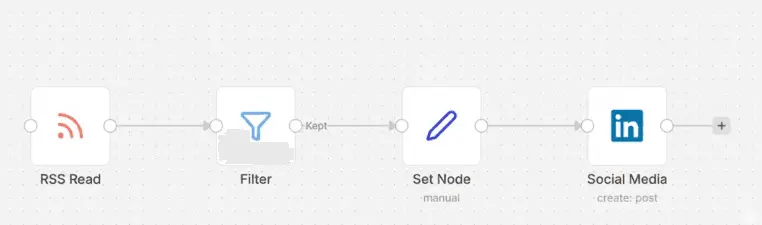
Guide: How to Automate Social Media Posts from Your Blog (using n8n)
Managing social media can be time-consuming. In this guide, we will build an automated workflow that detects a new post on your website and automatically shares it on Twitter (X) or LinkedIn using n8n.
The Goal
Whenever a new article is published on your WordPress, Medium, or Ghost blog, n8n will:
-
Detect the new post via RSS Feed.
-
Format a "New Post" announcement message.
-
Post it directly to your social media channels.
Prerequisites
-
n8n Account: (Self-hosted or Cloud).
-
Blog RSS Link: Usually yourdomain.com/feed.
-
API Credentials: Access to Twitter (X) Developer Portal or LinkedIn Developers.
Step 1: The Trigger (RSS Read Node)
The first step is to tell n8n where to look for new content.
-
Add Node: Search for the RSS Read node.
-
URL: Enter your blog’s RSS feed URL.
-
Event: Select "On every update" or set it to poll every hour.
-
Output: This node will output the blog Title, Link, and Publish Date.
Step 2: The Logic (Filter Node)
To prevent the system from posting old articles, we use a Filter node.
-
Add Node: Search for the Filter node.
-
Condition: Set it to check if the Publish Date is "greater than" the last time the workflow ran.
-
This ensures that only brand-new content triggers the social media post.
Step 3: Formatting (Set Node)
Now, we need to create a "Catchy" caption for your social media post.
-
Add Node: Search for the Set node.
-
Add Value: Create a string variable (e.g., tweetContent).
-
Expression: > New Blog Post: {{ $json.title }}
Read the full article here: {{ $json.link }} > #Automation #NewPost
Step 4: The Action (Twitter or LinkedIn Node)
Finally, we send the formatted message to your followers.
-
Add Node: Search for the Twitter or LinkedIn node.
-
Resource: Select "Tweet" or "Post."
-
Operation: Select "Create."
-
Text/Message: Drag and drop the tweetContent from the previous Set node.
Workflow Overview Table
n8n Workflow:
Why use n8n for this?
-
Cost Effective: Unlike Zapier, n8n allows you to run complex workflows for free (if self-hosted).
-
Privacy: You own your data and your API connections.
-
Scalability: You can easily add a ChatGPT node in Step 3 to summarize your blog post into a thread automatically!
Conclusion: Start Automating Smarter Today
Social media automation using n8n is not about convenience; it's about working smarter, scaling faster, and staying in control. For tech-savvy people or professionals focused on automating processes, n8n offers flexibility to scale with your needs.
Start small. Automate one social media workflow today using n8n and build from there. With time, you'll have a self-sustaining system running your content engine while you focus on what truly matters.