When I started working on Telegram automation at Saerin Tech LLC, I noticed a pattern: businesses weren't struggling with lack of tools—they were drowning in them. Sales data lived in one CRM, analytics in another dashboard nobody checked, and critical updates buried in email threads. The tools existed but didn't communicate.
We built a solution that turns Telegram into an intelligent command center. Users query databases, generate reports, and get insights all through natural conversation. No new [software](https://saerintech.com/services/custom-software-development) to learn, no complicated dashboards. Just chat.
Let me break down how we built these systems and what makes them work.
Why Telegram Is Ideal for Business Automation?
Telegram is an instant messaging app widely used for secure, team and real-time communication. It has reached 1 billion active users globally and offers some genuinely useful advantages over alternatives like Slack or WhatsApp Business:
Strong API support: Unlike WhatsApp's restrictive automation policies, Telegram's Bot API is well-documented and developer-friendly. You can build bots that handle commands, process files, and integrate with external systems without restrictions.
No rate limit headaches: Up to 30 messages per second across users. WhatsApp Business would throttle you way before that.
Native file handling: Supports documents up to 2GB. No external storage needed.
Zero learning curve: Everyone already knows how to use chat apps.
Setting up a bot takes about 5 minutes through BotFather (Telegram's bot creation tool). You get a token and can start building immediately.
Discover how Telegram automation can simplify your workflow TODAY!
The Technology Stack for Telegram AI
Our automation runs on a straightforward technology stack:
n8n handles workflow automation think Zapier but self-hosted and more flexible. We trigger workflows from Telegram messages, process data, query databases, and send responses back.
Google Gemini API powers the AI layer. We chose it over ChatGPT for better price-to-performance, longer context windows, and strong structured output support. When converting natural language to SQL or understanding complex questions, Gemini handles it.
PostgreSQL/Supabase for data storage. Most clients use PostgreSQL, though we've integrated with MySQL too.
Google Sheets API logs every query automatically. ExcelJS generates downloadable Excel files on-demand.
The flow is simple: Telegram → Webhook → n8n → AI Processing → Database Query → Formatted Response → Telegram.
Project 1: The BI Assistant (Natural Language to SQL)
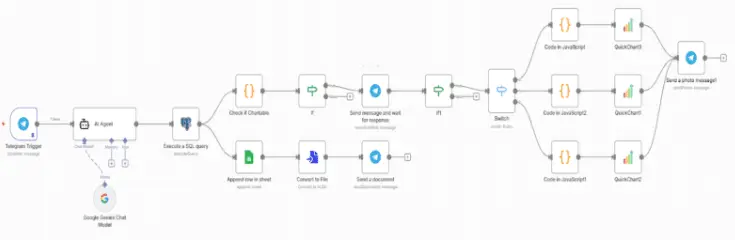
This was our most challenging build. Goal: let non-technical users ask business questions in plain English and get database answers.
The Core Challenge
When someone says "show me last month's sales," the system needs to:
- Understand "last month" means the previous calendar month
- Identify which table contains sales data
- Know which columns represent amount and date
- Generate valid SQL
- Execute safely without risking the database
Our Solution
Schema Context: We provide the AI with structured database information—table names, columns, relationships, and descriptions. For example: "The sales table has columns: id, product_name, amount, created_at, customer_id. It connects to customers via customer_id."
Prompt Engineering: We give the AI specific instructions including the schema, user's question, and strict rules (only SELECT statements, no DELETE/UPDATE, result limits, date handling guidelines).
Safety Validation: Before execution, we verify queries only use SELECT, don't contain dangerous keywords (DROP, DELETE, ALTER), reference existing tables, and avoid restricted tables.
Smart Formatting: Raw database output gets formatted into clean, readable Telegram messages with proper spacing and emoji indicators.
Real Example
The sales manager asks: "What were our top 5 products by revenue last month?"
The system:
- Receives question with schema context
- Generates SQL finding last month's products, grouped by name, summed by revenue, sorted by total
- Validates the query is safe
- Executes against PostgreSQL
- Returns formatted results (Premium Widget: $45,230, Standard Widget: $32,100, etc.)
- Offers Google Sheets export or Excel download
Response time: 3-5 seconds.
Technical Challenges We Solved
Time zones: "Last month" in which timezone? We default to the business's operational timezone.
Ambiguity: "Sales" could mean the sales table or a revenue column. We ask clarifying questions when needed.
Large datasets: Can't dump 500 rows into Telegram. We implemented pagination and auto-suggest Excel export for big results.
Performance: Complex queries taking 20+ seconds get a "processing" indicator so users know the bot is working.
Project 2: Database Chatbot with Conversational Memory
This builds on the BI Assistant by adding conversation context. The challenge: Telegram is stateless, but users expect the bot to remember.
The Memory Problem
Natural conversation looks like this:
User: "Show me customer data for ABC Corp"
Bot: [Returns customer info]
User: "What about their sales history?"
That second question needs context the bot must remember "their" refers to ABC Corp.
Session-Based Memory
We track conversations for each use
Store last 10 messages and relevant context
Add new messages to conversation history
Analyze if current message is a follow-up
Generate responses using both current and historical context
Sessions expire after 24 hours
Intent Classification
The AI categorizes each message:
Database query: "Show all customers from USA" → SQL generation path
Follow-up query: "What about their orders?" → Pulls context, then generates SQL
General chat: "Thank you!" → Friendly response
Context-Aware Queries
For follow-ups, we inject previous interaction details. We tell the AI: "User previously asked about New York customers. Now asking about 'their orders.' Generate a query continuing from that context."
Conversation Example
User: "Show me all customers from New York"
Bot: Returns 15 New York customers
User: "How many orders did they place last quarter?"
Bot: Understands "they" = New York customers, filters by those IDs, returns "47 orders totaling $23,450"
User: "Thanks!"
Bot: "You're welcome! Let me know if you need anything else."
The bot seamlessly switches between database and conversational modes.
Project 3: General-Purpose AI Assistant
Our most flexible implementation handles mixed conversations, answers questions, performs tasks.
Webhook Architecture
We use webhooks (not polling) because they're faster, more scalable, and work better with n8n. Telegram pushes messages to our server instantly.
Multi-Format Handling
Text messages: Straight to AI processing
Photos: Analyzed for text extraction or image description
Documents (PDFs, Word): Content extracted and fed to AI
Voice messages: Transcribed to text, then processed as queries
Response Management
Telegram limits messages to 4,096 characters. Long AI responses get split intelligently at sentence boundaries. We also handle rate limits (1 message/second to the same user) with strategic chunking and delays.
Real Usage
One client uses it for customer support:
-
Answers FAQs instantly (trained on their knowledge base)
-
Escalates complex issues to humans via Gmail
-
Tracks conversation history
-
Provides 24/7 support without night shift staff
Automatic Data Visualization
When query results are better understood visually, the bot auto-generates charts.
We analyze result structure:
-
Time-based data + numbers → Line chart
-
Categories + counts/sums → Bar chart
-
Parts of a whole → Pie chart
Using the QuickChart API, we define charts in JSON, get image URLs, and send them directly in Telegram.
Example: "Show monthly revenue for last 6 months" generates both a data table and a line chart showing trends.
Auto-Logging with Google Sheets
Every query gets logged to Google Sheets:
- Timestamp
- User ID
- Original question
- Generated SQL
- Result summary
This creates audit trails, usage analytics, training data for AI improvement, and debugging information.
Excel Export Feature
Users request Excel downloads for any query. We generate properly formatted spreadsheets with bold headers, auto-fitted columns, proper data types, and colored header rows.
Useful for sharing with colleagues, further analysis, archiving, and importing to other systems.
Security Measures
SQL Injection Prevention:
- Whitelist allowed tables
- Block dangerous operations (DELETE, UPDATE, DROP)
- Validate query structure (SELECT only)
- Restrict subqueries unless needed
User Authorization:
- Admins: Full access
- Managers: Departmental data only
- Team members: Role-specific data
Credential Management: All API keys stored in environment variables or secure credential managers never hardcoded.
Performance Optimizations
Query Caching: Common queries cached for 5 minutes. Reduces database load and improves response from 3-4 seconds to under 1 second.
Connection Pooling: Maintain 20 pre-established database connections instead of opening new ones per query. Reduces overhead from ~500ms to ~50ms.
Async Processing: Heavy operations (500-row Excel files, complex 6+ table joins) processed in the background queue with immediate acknowledgment to the user.
Real Production Results with Telegram Automation
After 8 months running these systems:
Usage Patterns
- Peak times: 9-11 AM for daily reports
- Common queries: Yesterday's sales, customer counts by region, top 10 products, pending orders
- Session length: 3-5 messages average
- Excel exports: 30% of queries
What Works
- Zero training needed users just start chatting
- Mobile-first access without VPN or dashboard logins
- 10-15 minute tasks reduced to 30 seconds
- 70% of routine data requests handled by AI
Still Improving
- Complex 4+ table joins
- Better ambiguity handling for vague queries
- Typo tolerance for mobile users
- Pagination UX for large datasets
Cost Analysis
For 500 queries/day:
- Gemini API: $12-18/month
- n8n hosting: $40/month
- PostgreSQL: $15/month
- Total: ~$70/month
Compared to enterprise BI tools at $500-5000/month per user.
Final Note
Start simple: Basic queries work 80% of the time. Add complexity gradually.
User feedback matters: Non-technical users will surprise you with how they phrase questions. Adapt your prompts accordingly.
Security first: We spent a week on SQL validation before adding features. Zero incidents since.
Cache everything: 60% response time improvement from caching common queries.
Helpful errors: Don't say "error occurred." Tell users what probably went wrong and how to fix it.
Monitor costs: LLM API spending adds up. Optimize prompts to reduce token usage.
The most rewarding part? Watching a sales manager who's never written SQL query complex databases using plain English. "Which New York customers placed orders over $5000 last quarter?" gets an instant answer.
That's the real value not replacing people, but giving them capabilities they didn't have before.
Want to see this in action? We offer live demos where you can test these systems with your own data. Reach out to discuss implementation for your workflow.